AI is rapidly moving from experimental demos to real production systems. Behind almost every AI-powered product — chatbots, copilots, recommendation engines, search assistants — lies a critical layer: AI APIs.
If Large Language Models (LLMs) are the “brain,” then AI APIs are the nervous system that allows applications to interact with that intelligence reliably, securely, and at scale.
In this blog, we’ll explore how AI APIs are designed, scaled, and operated in real-world systems.
Why AI APIs Matter
Raw AI models are not directly usable in production. You rarely deploy a model and let clients talk to it directly. Instead, you expose AI capabilities through a well-designed API layer that provides:
- Standardized access to AI capabilities
- Rate limiting and cost control
- Observability and logging
- Security and access control
- Versioning and backward compatibility
Without this layer, AI systems quickly become fragile, expensive, and unmanageable.
What Is an AI API?
An AI API is an abstraction layer that exposes machine intelligence as a service. Instead of dealing with models directly, applications call endpoints like:
/generate-text/embed/classify/summarize/chat
These APIs encapsulate:
- Model selection
- Prompt formatting
- Safety filters
- Response post-processing
- Logging and analytics
This separation allows teams to evolve AI systems without breaking client applications.
Types of AI APIs
Different AI workloads require different API shapes.
1. Text Generation APIs
Used for chatbots, content creation, copilots, and assistants.
Example
POST /v1/generate{
  "prompt": "Explain vector databases simply",
  "max_tokens": 300,
  "temperature": 0.7
}
Response
{
  "text": "A vector database stores embeddings...",
  "usage": { "tokens": 421 }
}
2. Chat APIs
Conversation-aware APIs that maintain context across turns.
Example
POST /v1/chat
{
  "messages": [
    {"role": "user", "content": "Explain RAG"},
    {"role": "assistant", "content": "..."},
    {"role": "user", "content": "Give real example"}
  ]
}
These are optimized for:
- Conversational memory
- Role-based messaging
- Tool calling (modern agents)
3. Embedding APIs
Used for semantic search, RAG, clustering, and recommendations.
POST /v1/embed
{
  "input": "Distributed caching explained"
}
Response
{
  "embedding": [0.012, -0.994, ...],
  "dimensions": 1536
}
4. Multimodal APIs
Support text + image + audio inputs.
Examples:
- OCR APIs
- Vision understanding
- Voice assistants
- Video intelligence
Multimodal AI APIs are becoming the default in modern AI platforms.
Designing a Good AI API
Designing AI APIs is different from traditional REST APIs because AI outputs are probabilistic, expensive, and context-dependent.
Let’s break down key design considerations.
1. Deterministic API, Probabilistic Engine
The API must be predictable, even if the model isn’t.
You achieve this by:
- Default parameters
- Prompt templates
- Guardrails
- Structured outputs
Example
Return JSON instead of free text:
{
  "summary": "...",
  "sentiment": "positive"
}
This makes downstream integration reliable.
2. Strong Schema Contracts
AI APIs must enforce strict request/response schemas.
Use:
- JSON Schema validation
- Structured output prompting
- Output parsing layers
This prevents “model drift” from breaking clients.
3. Model Abstraction Layer
Never expose raw models directly.
Instead, use a model router:
Client → AI API → Model Router → Model Provider
This enables:
- Model swapping (GPT → open-source)
- A/B testing
- Cost optimization
- Latency routing
This is critical for vendor independence.
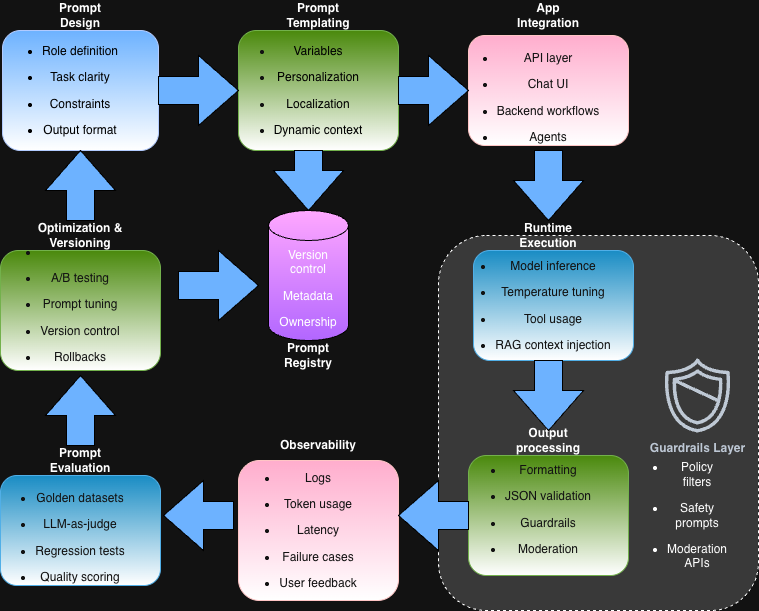
4. Prompt as Configuration
In AI APIs, prompts are part of system logic.
Treat prompts like:
- Config files
- Versioned assets
- Deployable artifacts
Modern teams store prompts in:
- Git
- Prompt registries
- Feature flags
This allows safe iteration without redeploying backend code.
AI API Architecture
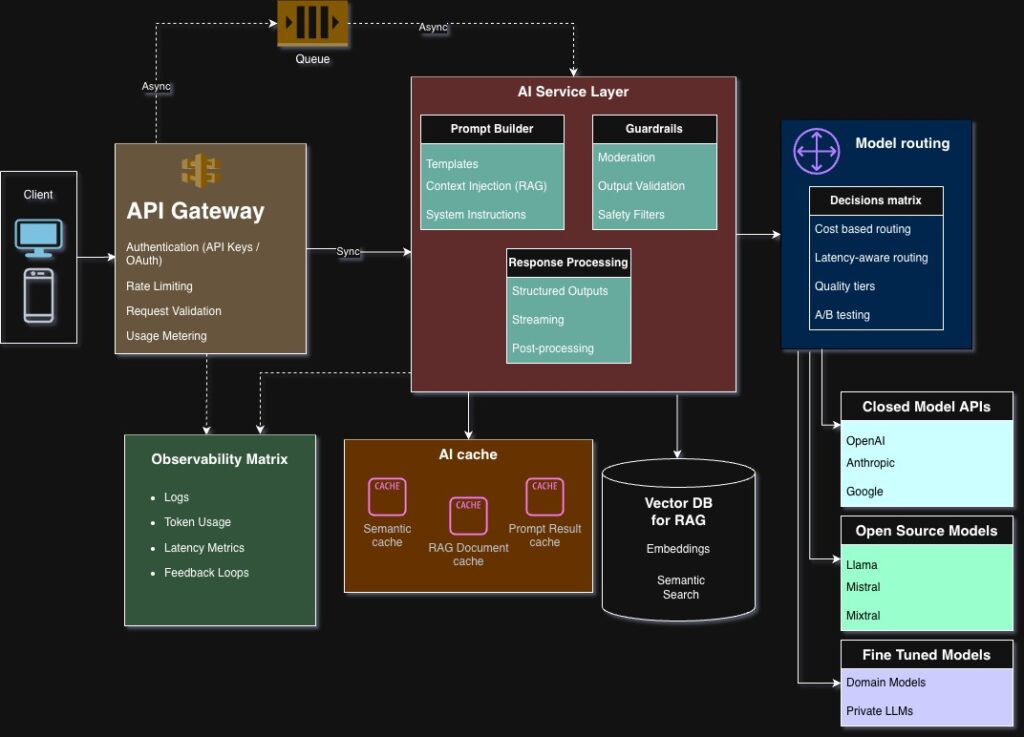
A typical production AI API stack looks like this:
Clients
   ↓
API Gateway
   ↓
AI Service Layer
   ↓
Model Router
   ↓
Model Providers (OpenAI, open-source, etc.)
Let’s break down each layer.
1. API Gateway
Handles:
- Authentication (API keys, OAuth)
- Rate limiting
- Request validation
- Usage metering
This protects expensive AI compute from abuse.
2. AI Service Layer
This is where most intelligence lives.
Responsibilities:
- Prompt construction
- Context injection (RAG)
- Guardrails and moderation
- Output formatting
- Observability hooks
This layer differentiates mature AI systems from simple wrappers.
3. Model Router
Routes requests based on:
- Cost sensitivity
- Latency requirements
- Quality tiers
- Region availability
Example
- Premium users → high-quality model
- Free users → cheaper model
This directly impacts profitability.
4. Provider Layer
AI APIs often integrate multiple providers:
- Hosted APIs (closed models)
- Self-hosted open-source models
- Fine-tuned domain models
Multi-provider architecture reduces vendor lock-in and improves resilience.
Scaling AI APIs
Scaling AI APIs is fundamentally different from scaling stateless REST APIs.
Why? Because:
- AI is compute-heavy
- Latency is high
- Costs are nonlinear
Let’s explore key scaling strategies.
1. Caching AI Responses
AI outputs are often reusable.
Common caches:
- Semantic cache (embedding similarity)
- Prompt-result cache
- RAG document cache
This can reduce cost by 30–80% in some workloads.
2. Async Processing
Not all AI requests need real-time responses.
Use async flows for:
- Document analysis
- Video processing
- Batch summarization
Pattern:
POST /analyze → job_id
GET /status/{job_id}
This improves reliability and throughput.
3. Streaming Responses
Streaming improves perceived latency dramatically.
Instead of waiting 5 seconds:
- Stream tokens progressively
- Show partial responses
- Enable real-time UX
This is essential for chat assistants and copilots.
4. Multi-Tier Model Strategy
Use multiple models strategically:
| Tier | Use Case |
|---|---|
| Small model | Fast responses, classification |
| Medium model | Most production workloads |
| Large model | Complex reasoning |
This balances:
- Cost
- Quality
- Latency
Reliability in AI APIs
AI failures are subtle and different from traditional outages.
Common failure modes:
- Hallucinations
- Toxic outputs
- Model drift
- Provider outages
Mitigation strategies:
1. Fallback Models
If one provider fails → route to another.
2. Guardrails
Use:
- Safety filters
- Output validators
- Regex/semantic checks
3. Retries with Prompt Variation
Small prompt changes often fix failures.
Observability for AI APIs
You can’t improve what you can’t measure.
AI observability includes:
- Prompt logs
- Token usage
- Latency distribution
- Output quality metrics
- User feedback loops
Modern AI teams track:
- Cost per feature
- Tokens per request
- Hallucination rates
This enables continuous optimization.
Security Considerations
AI APIs introduce new attack surfaces.
1. Prompt Injection
Attackers manipulate model behavior via inputs.
Mitigation:
- Input sanitization
- Instruction separation
- Output validation
2. Data Leakage
Sensitive data may appear in outputs.
Solutions:
- Redaction filters
- PII detection
- Retrieval boundaries
3. Abuse and Cost Attacks
AI endpoints can be extremely expensive.
Prevent using:
- Strict rate limiting
- Budget caps
- Per-user quotas
Versioning AI APIs
Unlike traditional APIs, AI systems evolve rapidly.
You must version:
- Prompts
- Models
- Output schemas
Common approaches:
URI Versioning
/v1/chat
/v2/chat
Capability Versioning
Expose features like:
- structured outputs
- tool calling
- multimodal support
This avoids breaking clients.
Real-World Example: AI Support Assistant
Let’s say you’re building an AI support assistant.
AI API flow:
- User sends query
- API fetches context from knowledge base (RAG)
- Prompt is constructed dynamically
- Model generates response
- Output is validated and formatted
- Response streamed to user
Behind the scenes:
- Usage logged
- Tokens tracked
- Feedback stored for improvement
This entire workflow is orchestrated by the AI API layer.
Build vs Buy: Should You Build Your Own AI API?
Many teams start with direct provider calls, then evolve to an internal AI API layer.
You should build one when:
- Multiple teams use AI
- You need cost control
- Vendor independence matters
- You want observability
Otherwise, managed platforms may be sufficient early on.
Key Takeaways
- AI APIs are the backbone of production AI systems
- They abstract complexity and provide control
- Good design enables scalability, safety, and cost optimization
- Observability and guardrails are non-negotiable
- The future of AI platforms will be defined by strong API layers
As AI adoption accelerates, the quality of your AI APIs will define the quality of your AI products.
What’s Next?
Now that you understand how AI services are exposed and operated, the next step is learning how to interact effectively with them.
In the next blog, we’ll explore:
Prompt Engineering — How to reliably control LLM behavior
This is where AI moves from experimentation to engineering discipline.