Notification systems are a critical infrastructure component for modern applications. Whether it is an OTP SMS, an order confirmation email, a push notification for a social update, or an internal system alert, notifications form the bridge between backend systems and end users.
At small scale, sending notifications may appear trivial. However, at scale—where millions of users, multiple channels, traffic spikes, and third-party dependencies are involved—notification systems become complex distributed systems that require careful design decisions.
In this blog, we design a scalable, reliable, and extensible notification system step by step, focusing on architecture, components, scalability strategies, APIs, trade-offs, and real-world considerations.
Index (Design Steps)
- Clarify the Problem
- Define Functional & Non-Functional Requirements
- Identify Notification Channels
- High-Level Architecture
- API Design
- Core System Components
- Message Queue & Event Flow
- Database Design
- Caching Strategy
- Fan-out & Delivery Models
- Scalability Strategies
- Failure Handling & Retries
- Security & Abuse Prevention
- Optional AI Enhancements
- Final Architecture Summary
- End-to-End Life Cycle of a Notification (Step-by-Step)
1. Clarify the Problem
The goal of a notification system is to accept notification requests and deliver messages reliably across multiple channels without blocking the calling services.
Key challenges:
- Notifications should not slow down core user actions
- Traffic can spike unpredictably (OTP storms, flash sales)
- External providers (SMS, email) can fail or throttle
- Different channels have different latency and reliability
Hence, the system must be asynchronous, decoupled, and horizontally scalable.
2. Functional & Non-Functional Requirements
Functional Requirements
- Send notifications via Email, SMS, Push, and In-App
- Support templates and dynamic payloads
- Track delivery status
- Retry failed notifications
- Respect user preferences
Non-Functional Requirements
- High availability
- Horizontal scalability
- Fault tolerance
- Eventual consistency
- Cost efficiency
These requirements guide all architectural choices that follow.
3. Identify Notification Channels
Different channels have different characteristics and provider ecosystems.
Common Channels & Providers
- AWS SES
- SendGrid
- Mailgun
SMS
- Twilio
- AWS SNS
- Vonage
Push Notifications
- Firebase Cloud Messaging (FCM)
- Apple Push Notification Service (APNs)
In-App Notifications
- Stored in DB and fetched via APIs
- Real-time via WebSockets
Because each provider enforces rate limits, quotas, and pricing, the system must abstract provider logic behind internal components.
4. High-Level Architecture
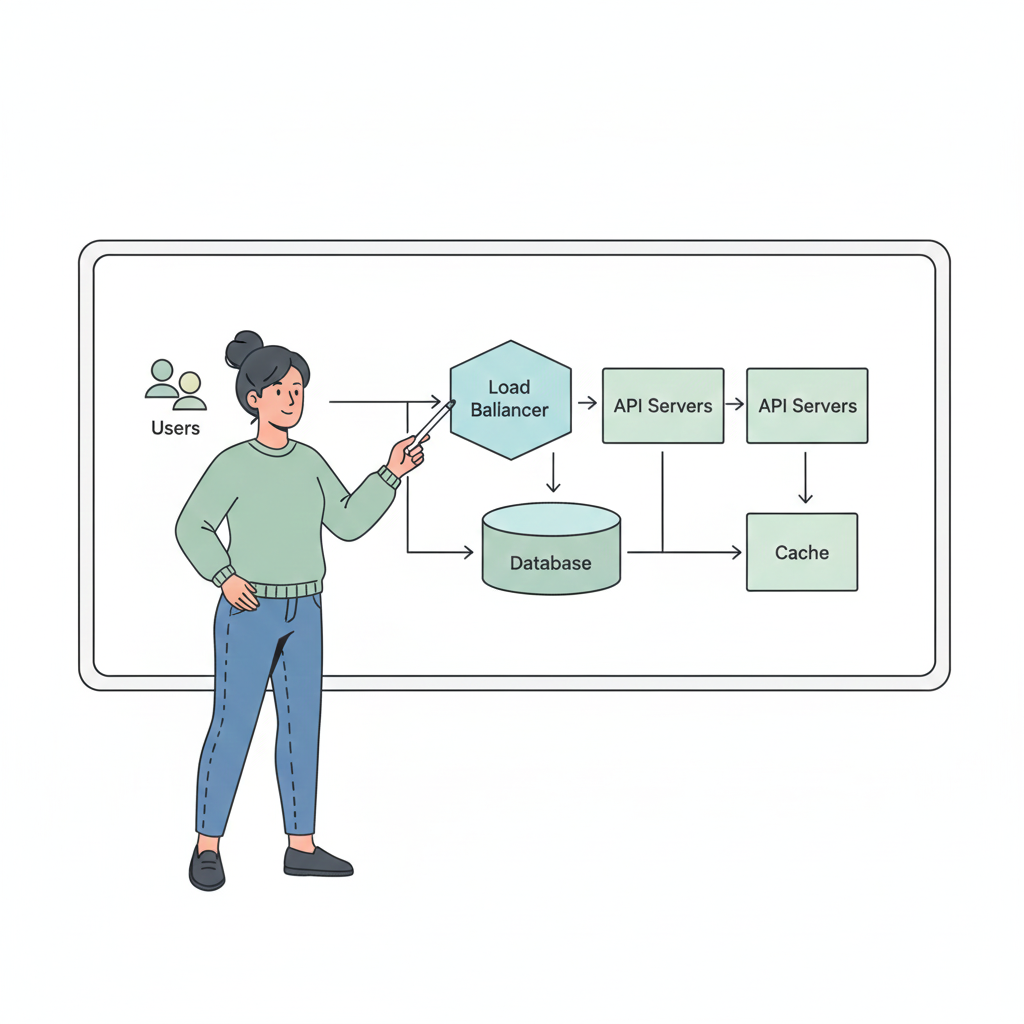
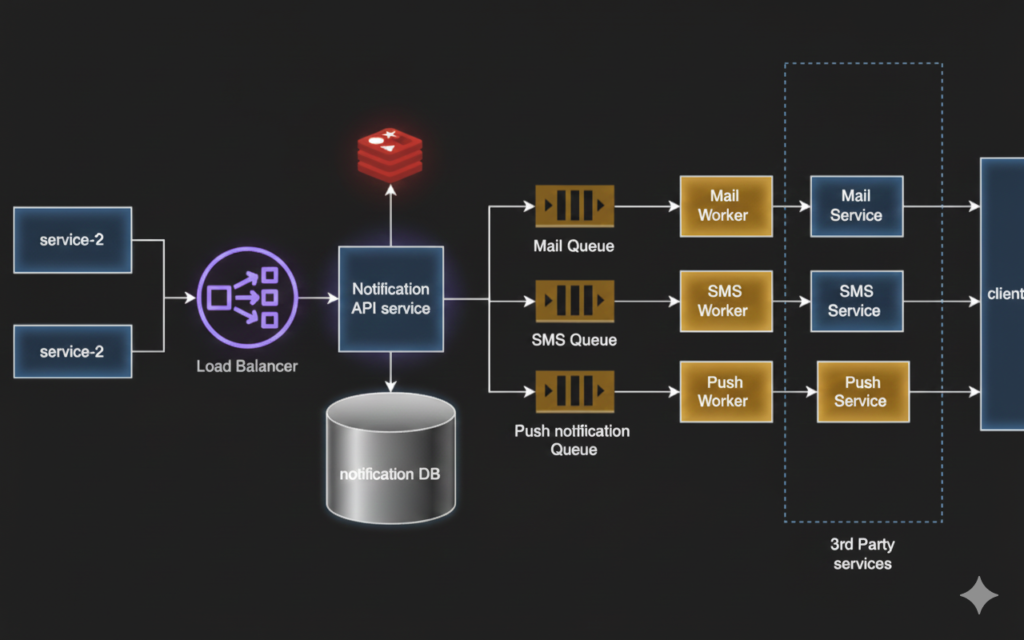
The notification system follows an event-driven architecture to ensure decoupling and scalability.
[ Client / Backend Service ]
            |
        [ Load Balancer ]
            |
      [ Notification API ]
            |
      [ Message Queue ]
            |
     [ Notification Workers ]
            |
 [ Email / SMS / Push Providers ]
            |
     [ DB + Cache ]
Why This Architecture?
1. Decoupling Producers from Delivery
Producers should never wait for notification delivery. By introducing a queue, producers hand off responsibility and continue their workflow immediately.
2. Handling Traffic Spikes
Queues act as buffers during OTP storms, flash sales, or marketing campaigns.
3. Independent Scaling
- API layer scales based on request rate
- Workers scale based on queue depth
- Providers are isolated behind workers
4. Fault Isolation
If SMS provider fails, email and push continue unaffected.
This architecture is widely used in large-scale systems like Amazon, Uber, and Netflix.
5. API Design
The API is designed to be simple, asynchronous, and resilient.
Send Notification API
Endpoint
POST /api/v1/notifications
Request
{
  "userId": "user_123",
  "channels": ["EMAIL", "SMS"],
  "templateId": "LOGIN_OTP",
  "payload": {
    "otp": "456789"
  },
  "priority": "HIGH"
}
Success Response
HTTP 202 Accepted
{
  "message": "Notification request accepted"
}
Error Responses
400 Bad Request– Invalid payload or missing fields401 Unauthorized– Invalid credentials429 Too Many Requests– Rate limit exceeded500 Internal Server Error– System failure
Returning 202 Accepted ensures the caller is not blocked by delivery latency.
6. Core System Components
Load Balancer
Distributes incoming traffic across API instances.
Options
- AWS ALB / ELB
- NGINX
- HAProxy
Supports horizontal scaling of API servers.
Notification API Service
- Stateless REST service
- Validates requests
- Applies basic business rules
- Publishes messages to queue
Scalability
- Horizontal scaling behind load balancer
- Auto-scales based on CPU or request rate
Message Queue / Event Broker
Acts as the backbone of the system.
Options
- Apache Kafka – High throughput, partitioned, durable
- RabbitMQ – Flexible routing, message acknowledgment
- AWS SQS – Managed, simple, auto-scaling
Queues ensure durability, buffering, and decoupling between producers and consumers.
7. Message Queue & Event Flow
Once a message is published:
- Queue stores the event durably
- Workers consume messages asynchronously
- Channel-specific logic is applied
- Message is sent to provider APIs
This model allows thousands of notifications to be processed in parallel.
8. Database Design
Database stores notification metadata, not delivery logic.
Notification Table
| Column | Description |
|---|---|
| id | Notification ID |
| user_id | Recipient |
| channel | EMAIL / SMS / PUSH |
| status | PENDING / SENT / FAILED |
| retry_count | Number of attempts |
| created_at | Timestamp |
Database Options
- PostgreSQL / MySQL – Strong consistency, reporting
- DynamoDB / Cassandra – High write throughput, massive scale
At very large scale, DB writes can be batched or async.
9. Caching Strategy
Caching reduces load on databases and improves latency.
Use Cases
- User notification preferences
- Templates
- Provider configuration
Cache Options
- Redis
- Memcached
Example
Key: user:123:notification_prefs
Value: { "EMAIL": true, "SMS": false }
10. Fan-out & Delivery Models
Fan-out on Write
- Expand messages per user/channel immediately
- Faster delivery, higher write load
Fan-out on Read
- Store one event, expand during consumption
- Lower write cost, more complex workers
Example
- OTP notifications → fan-out on write
- Marketing campaigns → fan-out on read
11. Scalability Strategies
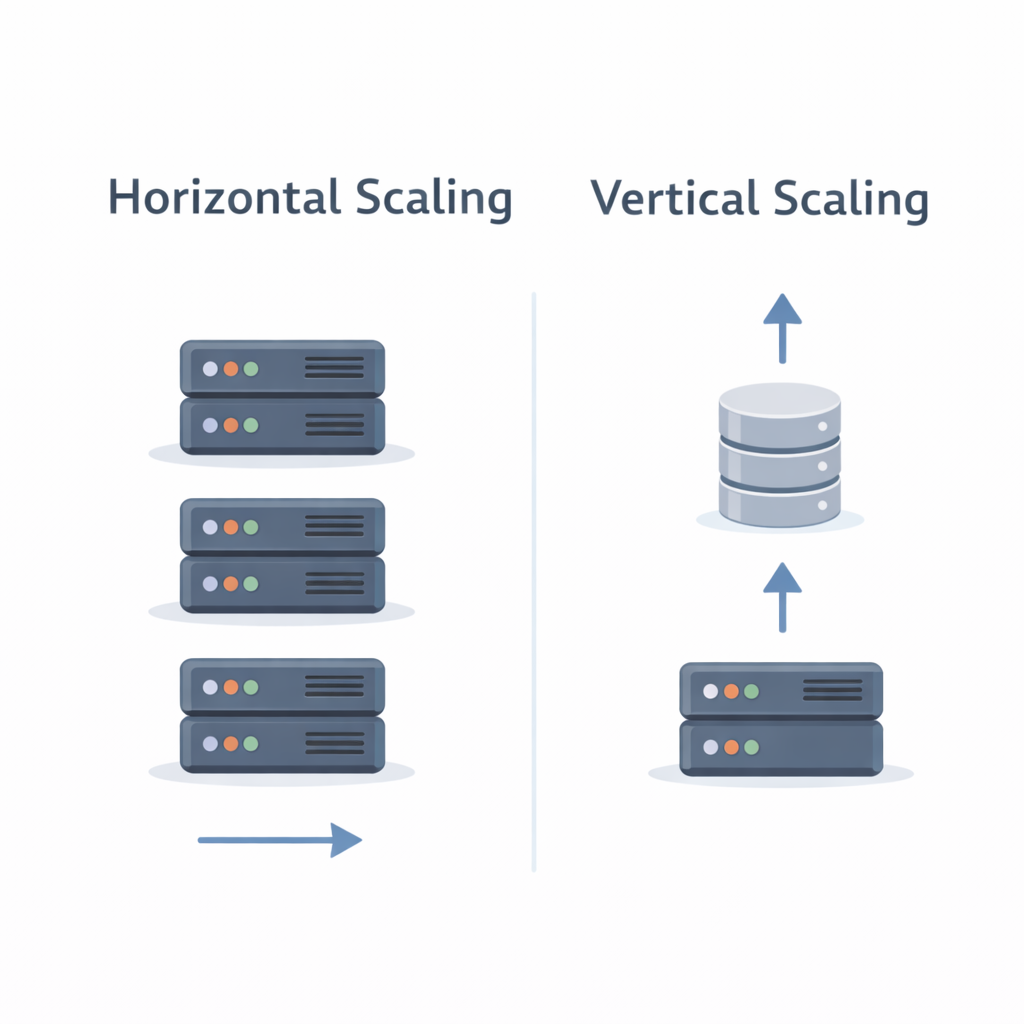
Horizontal Scaling
- API servers scale independently
- Worker pools scale based on queue depth
Queue Partitioning
- Kafka partitions enable parallel consumption
- SQS supports unlimited consumers
Channel Isolation
Separate queues per channel:
email_queue
sms_queue
push_queue
This prevents one channel failure from impacting others.
12. Failure Handling & Retries
Failures are inevitable due to provider downtime or throttling.
Strategy
- Retry with exponential backoff
- Max retry limit
- Move failed messages to Dead Letter Queue (DLQ)
DLQs allow debugging and replay without data loss.
13. Security & Abuse Prevention
- Authentication (JWT / OAuth)
- Rate limiting using Redis
- Template whitelisting
- Provider quota enforcement
These controls prevent spam, misuse, and cost explosion.
14. Optional AI Enhancements
AI can enhance—but not block—the system.
Examples
- Predict best send time
- Prioritize urgent notifications
- Spam detection
- User engagement scoring
AI is typically placed after queue consumption to avoid affecting ingestion latency.
15. Final Architecture Summary
[ Clients / Services ]
        |
[ Load Balancer ]
        |
[ Notification API ]
        |
[ Message Queue ]
        |
[ Worker Pools ]
        |
[ Email / SMS / Push Providers ]
        |
[ Database + Cache ]
This architecture is:
- Scalable
- Fault tolerant
- Cloud-native
- Interview-ready
- Production-proven
End-to-End Life Cycle of a Notification (Step-by-Step)
To understand how all the components come together, let’s walk through the complete journey of a single notification from the moment it is triggered to the moment it is delivered.
Example Scenario
A user attempts to log in, and the system must send a One-Time Password (OTP) via SMS.
Step 1: Notification Request Is Triggered
The authentication service detects a login attempt and triggers a notification request.
POST /api/v1/notifications
{
  "userId": "user_101",
  "channels": ["SMS"],
  "templateId": "LOGIN_OTP",
  "payload": {
    "otp": "739281"
  },
  "priority": "HIGH"
}
At this point, the calling service does not care about delivery. It only wants confirmation that the request has been accepted.
Step 2: Load Balancer Routes the Request
The request first reaches the Load Balancer.
Purpose of Load Balancer
- Distributes traffic across multiple Notification API instances
- Prevents overloading a single server
- Enables horizontal scaling
Common Products
- AWS Application Load Balancer (ALB)
- NGINX
- HAProxy
The load balancer forwards the request to a healthy Notification API instance.
Step 3: Notification API Validates the Request
The Notification API Service performs lightweight processing:
- Validates request schema
- Authenticates the caller (JWT / API Key)
- Checks rate limits, notification preference (via Redis)
- Normalizes the payload
Cache Interaction
Before proceeding, the API may query the cache:
Cache Key: user:101:notification_preferences
- If user has opted out of SMS → request rejected
- If cache miss → preferences fetched from DB and cached
This prevents unnecessary queue and provider usage.
Step 4: Notification Metadata Is Persisted
The API writes a record to the database:
| Field | Value |
|---|---|
| user_id | user_101 |
| channel | SMS |
| status | PENDING |
| retries | 0 |
Database Options
- PostgreSQL / MySQL (transactional consistency)
- DynamoDB (high write throughput)
This ensures durability — even if workers crash, the notification is not lost.
Step 5: Message Is Published to Queue
The API publishes a message to the Message Queue:
{
  "notificationId": "notif_789",
  "userId": "user_101",
  "channel": "SMS",
  "priority": "HIGH"
}
Queue Options
- AWS SQS (managed, auto-scale)
- Apache Kafka (high throughput, partitioned)
- RabbitMQ (routing flexibility)
At this point:
- API responds with 202 Accepted
- Client flow is complete
- Delivery is now fully asynchronous
Step 6: Queue Buffers and Orders Messages
The queue acts as a shock absorber:
- Handles traffic spikes (e.g., OTP storms)
- Ensures durability
- Orders messages (Kafka partitions)
High-priority OTP messages may be routed to a priority queue to ensure faster processing.
Step 7: Notification Worker Consumes the Message
A Notification Worker pulls the message from the queue.
Worker Scaling
- Multiple workers run in parallel
- Auto-scale based on queue depth
- Channel-specific workers (SMS workers only)
Workers are stateless and horizontally scalable.
Step 8: Worker Fetches Template & Applies Payload
The worker fetches the SMS template:
Cache Key: template:LOGIN_OTP
- Cache hit → faster processing
- Cache miss → fetch from DB and cache it
The template is populated with:
Your OTP is 739281
Step 9: SMS Is Sent via External Provider
The worker calls the SMS provider API.
Provider Examples
- Twilio
- AWS SNS
- Vonage
The worker handles:
- Provider rate limits
- Timeouts
- Temporary failures
Step 10: Success or Failure Handling
Success Case
- Provider returns
200 OK - Worker updates DB status to
SENT - Message acknowledged in queue
Failure Case
- Provider times out or returns error
- Retry count incremented
- Message re-queued with exponential backoff
Step 11: Retry and Dead Letter Queue (DLQ)
If retries exceed a threshold:
- Notification is moved to Dead Letter Queue
- Status updated to
FAILED - Alerts generated for investigation
DLQ Benefits
- Prevents infinite retry loops
- Enables manual replay
- Improves system stability
Step 12: Observability & Metrics
Throughout the lifecycle, metrics are collected:
- Queue depth
- Delivery latency
- Success/failure rates
- Provider performance
These metrics drive:
- Auto-scaling decisions
- Alerting
- Cost optimization
Lifecycle Summary Flow
Client
  → Load Balancer
    → Notification API
      → Cache (Preferences)
      → Database (PENDING)
      → Message Queue
        → Notification Worker
          → Cache (Template)
          → Provider API
            → Database (SENT / FAILED)
            → DLQ (if needed)
Why This Lifecycle Works Well at Scale
- Asynchronous design prevents blocking
- Queue-based buffering absorbs spikes
- Cache reduces DB load
- Stateless workers scale independently
- Retries + DLQ ensure reliability
This lifecycle demonstrates how every system component plays a precise role, making the notification system robust, scalable, and production-ready.
What’s Next?
With notifications covered, the next logical problem is Designing a Scalable News Feed/Social Media system.