In large-scale systems, reads dominate writes.
Users expect fast responses, whether they’re searching, scrolling feeds, or loading product pages. This is why indexing and read optimization are critical parts of system design.
In this blog, we’ll cover how indexes work, their trade-offs, and how search systems optimize reads at scale.
What Is an Index?
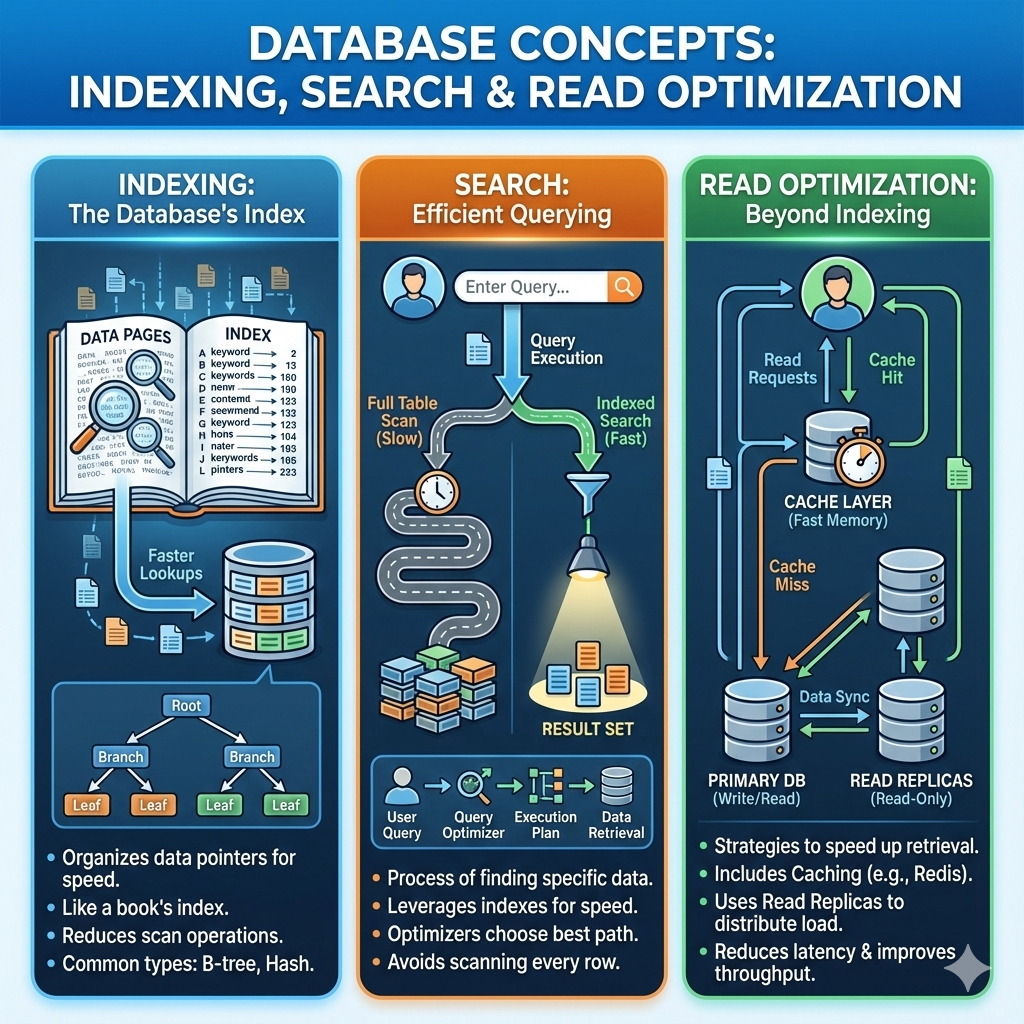
An index is a data structure that allows databases to find data quickly without scanning every row.
Without an index:
- Database performs a full table scan
- Performance degrades as data grows
With an index:
- Database locates records efficiently
- Read latency improves significantly
Analogy:
An index is like the index in a book—it tells you where to find information quickly.
How Indexes Improve Performance
Indexes reduce the number of disk reads by:
- Narrowing down search space
- Enabling faster lookups, sorting, and filtering
Example:
Querying users by email without an index requires scanning all users. With an index on email, the database jumps directly to the matching record.
Common Index Types (High Level)
B-Tree Index
- Most common index type
- Maintains sorted order
- Supports range queries
Use case:
Searching by date ranges, IDs, or ordered fields
Hash Index
- Uses hash functions for direct lookup
- Extremely fast for equality queries
Limitation:
Does not support range queries
Trade-Offs of Indexing
Indexes are not free.
Pros:
- Faster reads
- Better query performance
Cons:
- Slower writes (indexes must be updated)
- Increased storage usage
Rule of Thumb:
Index fields that are frequently searched, filtered, or joined—but avoid over-indexing.
Read Optimization Techniques
1. Covering Indexes
Index contains all required query fields, avoiding table lookups.
2. Denormalization
Duplicate some data to reduce joins.
Example:
Storing username in order records to avoid joining users table.
3. Read Replicas
Distribute read traffic across replicas.
4. Caching
Cache frequent queries or query results to reduce database load.
Search Systems vs Databases
Databases are optimized for transactions, not full-text search.
For complex search needs, systems use search engines.
Search Engines (High Level)
Search engines like Elasticsearch are designed for:
- Full-text search
- Ranking and relevance
- Fast keyword-based queries
How They Work (Simplified):
- Data is indexed into inverted indexes
- Queries match keywords instead of rows
Use cases:
- Product search
- Log analytics
- Auto-complete and filtering
When to Use Database vs Search Engine
- Use databases for CRUD operations and transactions
- Use search engines for text search, ranking, and filtering
Many systems use both together.
Key Takeaways
- Indexes are essential for fast reads
- B-Tree indexes support most queries
- Indexing improves reads but slows writes
- Read optimization uses replicas, caching, and denormalization
- Search engines complement databases for advanced search
Good indexing strategy can mean the difference between a fast system and an unusable one.
What’s Next?
In the next blog, we’ll explore:
👉 Microservices vs Monolith
You’ll learn how architectural choices impact scalability and team velocity.